Tranquility Base · capture audit
Ninety-four splices a second
Your ear was right. The app converts every 10 ms microphone buffer with a brand-new sample-rate converter and throws away the tail of each one: 3.3 percent of the audio is gone, as 94 tiny cuts a second. That is the fuzz on your voice. The loud room and the 30 percent mic gain are real too, but they are a second, smaller story.
Shipped: PR #460, merged 15 Sep 09:50, live in Dev as of 09:56
A sample-rate converter is a filter with memory. The app builds a fresh one for every 512-frame buffer, feeds it once, and never asks for the tail, so each buffer yields 165 frames where 170.7 belong. Keep one converter across the capture, reset it at key-down; the end-of-capture flush is a separate second step. Twenty lines in TranquilityCore, no change to the capture stack that had the 12 August history. Merged as PR #460 with five tests; the flush was ruled out on purpose (see below). Verified on your first dictation after the deploy: 170.7 frames per buffer, 0.2 percent lost.
Once the splices are gone, the remaining difference from QuickTime is bandwidth (8 kHz versus 24 kHz), which is intentional and mild. The 30 percent mic gain and the distance to the laptop still cost you a clean floor; the poor-capture readout from the earlier version of this page stays on the list.
Why the app's file is not QuickTime's file
Some of the difference is by design. QuickTime kept everything the microphone gave it: 48,000 samples a second as 32-bit floats, 192 kB per second, 10 MB for 49 seconds. The app records what the transcriber consumes: 16,000 samples a second as 16-bit integers, 32 kB per second, 1.7 MB for 54 seconds. That is a six-fold saving and it costs only the band above 8 kHz, which carries some crispness in consonants and nothing the transcriber uses. Done properly, a voice recording at 16 kHz sounds like a good phone call, not like static.
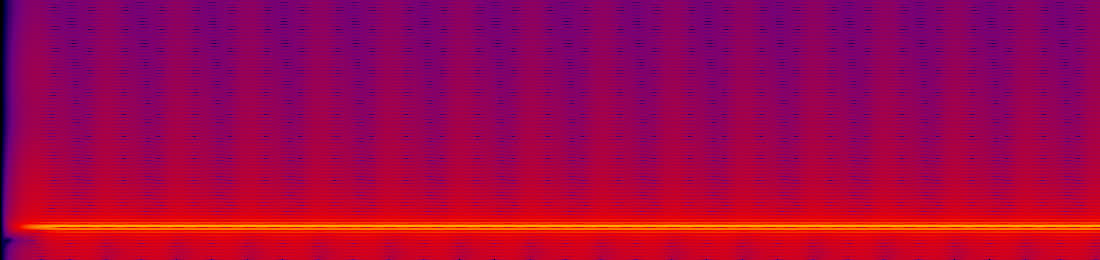
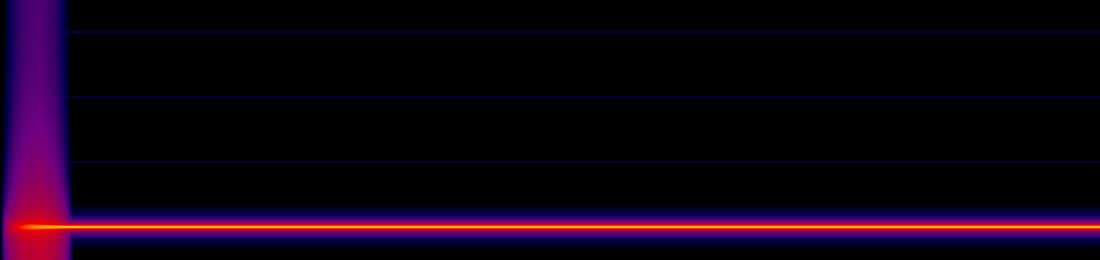
The static comes from how the conversion is done. The microphone delivers 512 frames every 10.7 ms. For each delivery the app constructs a new AVAudioConverter, hands it that one buffer, takes whatever comes out, and discards the converter. A rate converter is a filter that needs history on both sides of every output sample; with no history and no flush, each buffer produces 165 frames instead of 170.7. The missing 5.7 frames, a third of a millisecond, are simply cut, and the next buffer is glued straight on. Ninety-four cuts a second, each a small jump in the waveform, each proportional to how loud your voice is at that instant. That is why the fuzz rides on your voice and not on the silence.
The proof on a pure tone
A 1 kHz sine at 48 kHz, converted to 16 kHz both ways. Everything that is not the tone, measured after notching the tone out:
The same arithmetic in the app's own log
Every capture line records seconds open, buffers delivered, and bytes kept. Bytes at 32 kB per second should match seconds open. They never do.
| Capture | Open | On disk | Lost | Frames per buffer |
|---|---|---|---|---|
| 08:44, this session's first message | 54.26 s | 52.35 s | 3.5% | 165.0 |
| 08:37 | 57.92 s | 55.91 s | 3.5% | 165.0 |
| 08:42 | 80.55 s | 77.80 s | 3.4% | 165.0 |
| 09:00, the message that asked this question | 85.07 s | 82.16 s | 3.4% | 165.0 |
| Your QuickTime file, replayed through the same code | 49.13 s | 47.50 s | 3.3% | 165.0 |
The expected figure is 170.67 frames per 512-frame buffer. The code has carried this since the original engine tap; the comment at the call site says the conversion "was never the problem". Every transcription the app has ever sent went with a third of a millisecond cut from every hundredth of a second.
Does the transcriber notice?
Your QuickTime recording, converted both ways, replayed through the live AssemblyAI stream with the app's own lexicon. One sample, so a tendency, not a measurement.
| Path | Transcript of the middle sentence |
|---|---|
| What you said | "It seems very static and far away, and I'm noticing some transcription errors. Uh, when I recorded it. It kind of sucks." |
| The app's way | "It sounds very staticky. I'm far away and I'm noticing some transcription errors. Uh, when I recorded it. When I record with Tranquility Base, it kind of sucks." |
| One converter | "It seems very static and far away, and I'm noticing some transcription error. But, uh, when I record with Tranquility Base, it kind of sucks." |
Both keep the meaning. The spliced version drifts on three words in one sentence where the clean one drifts on one, and both invent the same "with Tranquility Base" at the end, which is the lexicon boost at work rather than the audio. The splices cost you a little accuracy; they cost you a lot of listening comfort.
Verified on the running app
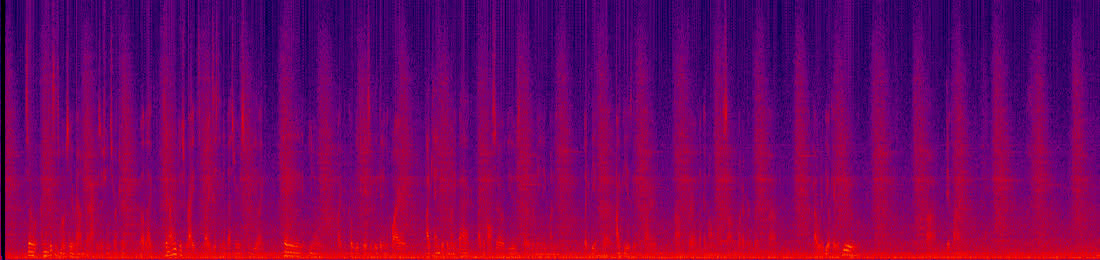
Your first dictation on the new build, 09:58, 46 seconds. The capture line now reads 170.7 frames per buffer and the file is 0.2 percent shorter than the mic-open time, which is the run-up paid once. The transcript came through clean.
| Ten seconds of it |
|---|
A correction to this page
Earlier I wrote that the 07:20 capture "clipped at full scale" because its log line said peak 1.0000. That number is the app's level meter, an RMS figure scaled by eight and capped at one, not a sample peak. The file's true peak is −8 dB and the fixed build's first capture, also logged at 1.0000, peaks at −20 dB. Nothing clipped. The row in the level table is corrected.
Listen for yourself
Ten seconds of your QuickTime recording, converted both ways by the code in this page. Same source, same room, same microphone; only the conversion differs. Then two seconds of the tone. Headphones make it obvious; the AirPods will do.
| Your voice, the app's way | Your voice, one converter |
|---|---|
| 1 kHz tone, the app's way | 1 kHz tone, one converter |
Is the fix safe, and does it cost latency?
- It is the documented way to use the converter. AVAudioConverter exists to be fed buffer after buffer and keep its filter history between them. The app's per-buffer construction is the unusual thing. Keeping one instance across a capture is what every streaming recorder on macOS does.
- Latency: about a third of a millisecond, once. A rate converter needs a few input samples of run-up before its first output. Today the app pays that run-up 94 times a second and throws the samples away. With one converter it is paid once at key-down: the stream arrives 0.35 ms later and nothing is lost. Against the 100 ms from key-down to the mic opening it does not register, and the transcriber sees the same 16 kHz stream, just whole.
- It costs less CPU, not more. Constructing a converter on the audio render thread every 10 ms is the kind of allocation that thread is meant to avoid. One construction at unit build removes it.
- The flush is the only part with a subtlety. The last 0.35 ms of a capture sits inside the converter at key-up. Asking for it is one extra call, but it has to happen after the final buffer is delivered, and buffers can trail the key-up by a few callbacks. So the branch does the safe thing first: one converter, reset at key-down, and the tail of the very last buffer is the one third of a millisecond still dropped, once per capture instead of 94 times a second. The flush comes as a second commit with its own test, or not at all if the trailing-buffer path makes it fragile.
- Rebuilt with the unit. The converter is tied to the microphone's format. When the device is rebuilt (the log shows one such rebuild this morning), the converter is rebuilt with it, the same way the tap format is today.
The room, separately

Level per capture
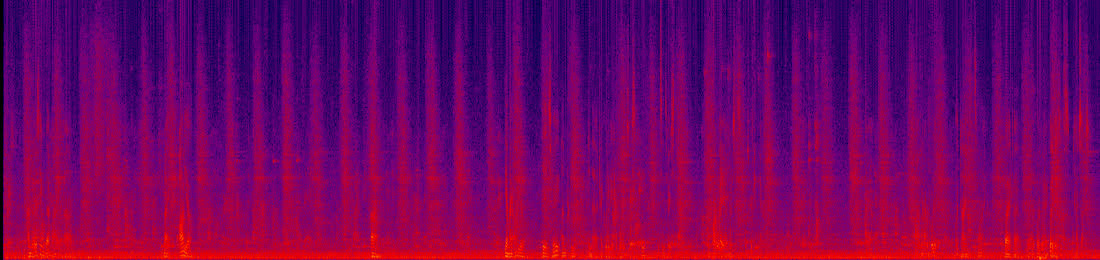
Floor is the quietest tenth of 100 ms frames; speech is the loudest hundredth. Their gap is what the transcriber has to work with.
| Capture | Floor | Speech | Gap | Note | |
|---|---|---|---|---|---|
| 8 Sep | −55 dB | −31 dB | 25 dB | clean | |
| 11 Sep | −52 dB | −32 dB | 20 dB | clean | |
| 12 Sep | −61 dB | −26 dB | 35 dB | pictured above | |
| 13 Sep | −62 dB | −31 dB | 32 dB | clean | |
| 14 Sep, 22:04 | −71 dB | −29 dB | 42 dB | last night, best of the week | |
| 15 Sep, 07:20 | −35 dB | −21 dB | 14 dB | muffled above 2 kHz; the mic close to something | |
| 15 Sep, 08:37 | −44 dB | −33 dB | 11 dB | ||
| 15 Sep, 08:42 | −43 dB | −33 dB | 10 dB | one loud transient | |
| 15 Sep, 08:44 | −43 dB | −33 dB | 10 dB | this session's opening message, pictured above | |
| 15 Sep, 08:45, QuickTime | −43 dB | −33 dB | 10 dB | your control recording, same minute, outside the app |
The control you ran
Your QuickTime recording from the same minute (49 seconds, 48 kHz, saved 08:45) measures the same as the app's capture to within a decibel: floor −43 dB, speech −33 dB, a 10 dB gap, peak −17 dB. Two recorders, one result. Whatever is wrong is in front of the microphone, not behind it.
What the room story is not
- Not a different microphone. The log names MacBook Pro Microphone at 48 kHz for every unit build on 14 and 15 September. The AirPods are the system default, but the app pins the built-in mic by design and the preference is unset.
- Not dropped buffers. Today's 54 second capture has 5,076 buffers delivered and 5,076 kept, and one run of digital silence: the first 164 ms, which is the open latency. The loss is inside each buffer, not between them, which is why I missed it on the first pass: I checked that every buffer arrived and not that every buffer was whole.
- Not the transcriber. AssemblyAI opened at 16 kHz with the lexicon and covered every second of audio. It was handed a voice barely above the noise, and the errors you saw are what that sounds like to a model too.
- Not a code change. Nothing in the capture path changed between last night's clean recording and this morning's. The splices were in last night's recording too; a quiet floor hid them.
What changed, as far as the machine can see
- The room got loud, or you got far. A steady band below 600 Hz plus hiss across the whole range is a fan, air handling, or traffic, and the voice is small against it. Gain does not explain this: turning a mic down lowers voice and room together. Where the laptop sits relative to you is the one thing I cannot read from here.
- The mic is quiet. 30 percent input volume on the built-in mic. The app never touches this setting, so something else set it: the slider by hand, or a meeting app's automatic level adjustment. Zoom and Loom are both running, though no meeting is live.
- 07:20 was different again. That capture had a floor of −35 dB and almost nothing above 2 kHz: a mic very close to something, or covered. The lid opened at 06:40 and again at 07:55, and the mic unit rebuilt at 08:17 after another app re-rated the device.
- You hear the app in the AirPods. They are the default output, so the laptop can be anywhere in the room and the announcements still sound close. The microphone does not get that privilege.
What I got wrong on the first pass
I measured levels and levels were identical, and I said the app was cleared. Levels cannot see a splice: the energy is the same, it is just in the wrong place. The tone test would have shown it in a minute. Ear first, then the right instrument. ◼